CI/CD Pipeline
The build process consists of two workflows. The CI workflow builds and validates artifacts on every push. When a version tag is created, the release workflow publishes the previously built artifacts instead of rebuilding them.
CI Workflow (build-agent-ci.yml)
Triggered on every push to master or feature/** branches.
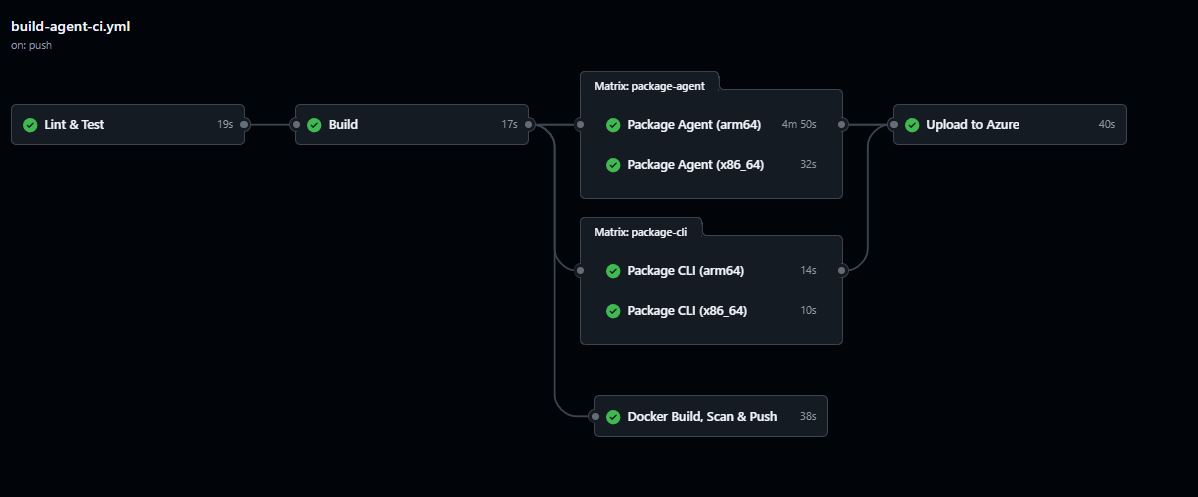
Jobs
| Job | Runs on | Purpose |
|---|---|---|
| Lint & Test | all branches | ESLint + unit tests for agent and CLI |
| Build | all branches (after test) | TypeScript compile for agent and CLI, outputs version metadata |
| Docker Build, Scan & Push | all branches | Builds the Docker image, Trivy vulnerability scan, pushes :sha and :latest tags |
| Package Agent (x86_64 / arm64) | master only | Builds production tarballs for both architectures, rebuilds native modules for ARM64 via QEMU |
| Package CLI (x86_64 / arm64) | master only | Builds CLI tarballs for both architectures |
| Upload to Azure | master only | Downloads all package artifacts and uploads to Azure Blob Storage staging path agent/builds/{version}/ |
Flow
Lint & Test
    └── Build
          ├── Docker Build, Scan & Push
          ├── Package Agent (x86_64)  ──┐
          ├── Package Agent (arm64)   ──┼──→ Upload to Azure
          ├── Package CLI (x86_64)    ──┤
          └── Package CLI (arm64)    ──┘
Test gates build. If ESLint or unit tests fail, TypeScript compilation is skipped. Feature branches get the full quality gate (test → build → Docker) but no packaging or Azure upload — only master pushes produce deployable artifacts.
Release Workflow (build-agent-release.yml)
Triggered automatically by the CI auto-tag job after a successful master build, or manually from the GitHub Actions UI.
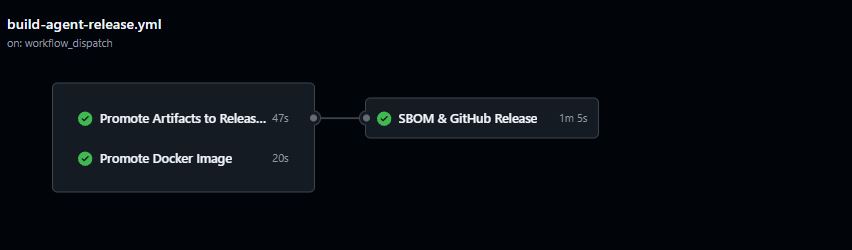
No rebuild. The release workflow promotes the artifacts that CI already built and tested — the same bits that passed the quality gate are what ships.
Jobs
| Job | Purpose |
|---|---|
| Promote Artifacts | Downloads staged tarballs from agent/builds/{version}/, verifies SHA-256 checksums, re-uploads to versioned (agent/versions/) and rolling-latest (agent/agent-latest-*.tar.gz) paths, publishes agent/install.sh |
| Promote Docker | Re-tags iotistic/agent:{sha} → iotistic/agent:{version} via manifest copy — no layer transfer or rebuild |
| SBOM & GitHub Release | Generates CycloneDX SBOMs with Syft from promoted artifacts, uploads to Azure, creates a GitHub Release with tarballs and checksums attached |
Flow
Promote Artifacts ──┐
Promote Docker     ──┴──→ SBOM & GitHub Release
How to release
- Bump
versioninagent/package.json— commit and push to master - Wait for CI to pass and
Upload to Azureto complete - Tag and push:
git tag v1.0.522
git push origin v1.0.522
The release workflow detects the tag, verifies the staged artifacts exist for that version, and promotes them. If the tag version does not match what CI uploaded, the verify step fails immediately with a clear error.
Artifact layout on Azure
agent/
  builds/{version}/           ← CI staging (source of truth)
    agent-{version}-x86_64.tar.gz
    agent-{version}-arm64.tar.gz
    install.sh
    build-meta.json

  versions/                   ← Release permanent paths
    agent-{version}-x86_64.tar.gz
    agent-{version}-arm64.tar.gz
    install-{version}.sh
    {version}/sbom/           ← CycloneDX SBOMs

  agent-latest.tar.gz         ← Rolling latest (x86_64)
  agent-latest-x86_64.tar.gz
  agent-latest-arm64.tar.gz
  install.sh                  ← Served at https://get.iotistica.com/agent
Install
The install script always downloads the latest released agent:
curl -sfL https://get.iotistica.com/agent | sudo sh
To install a specific version, download the versioned tarball directly from the release page on GitHub.