Subscriptions
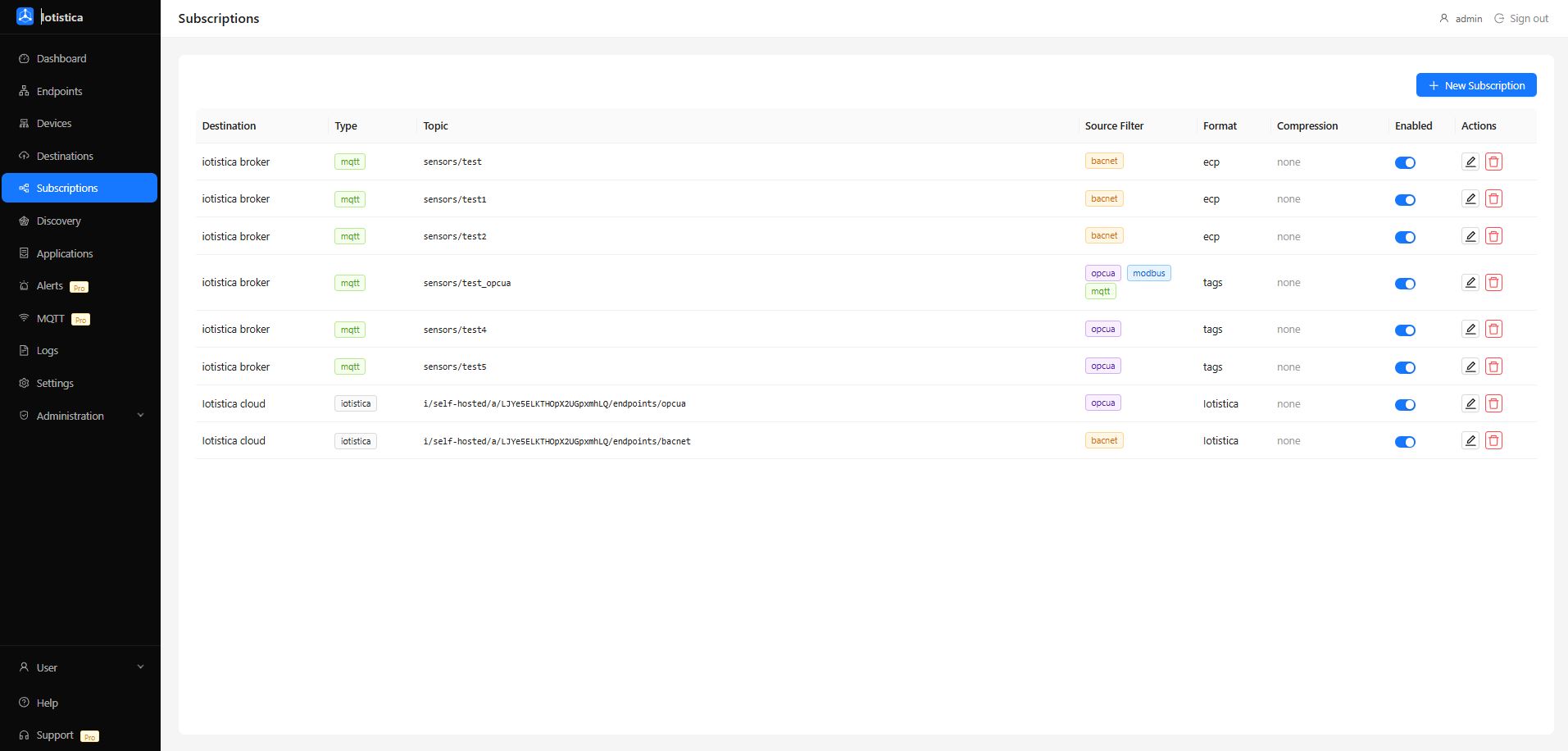
A subscription is the rule that connects your endpoint data to a destination. Without a subscription, data collected from devices goes nowhere.
The Idea
Think of it as a pipe with filters. You specify:
- What data — which protocol(s) to pull from (Modbus, OPC-UA, BACnet, or all of them)
- Where it goes — which destination to send to
- How it's formatted — the payload format the destination expects
- Which topic/measurement — the MQTT topic or InfluxDB measurement to write to
Adding a Subscription
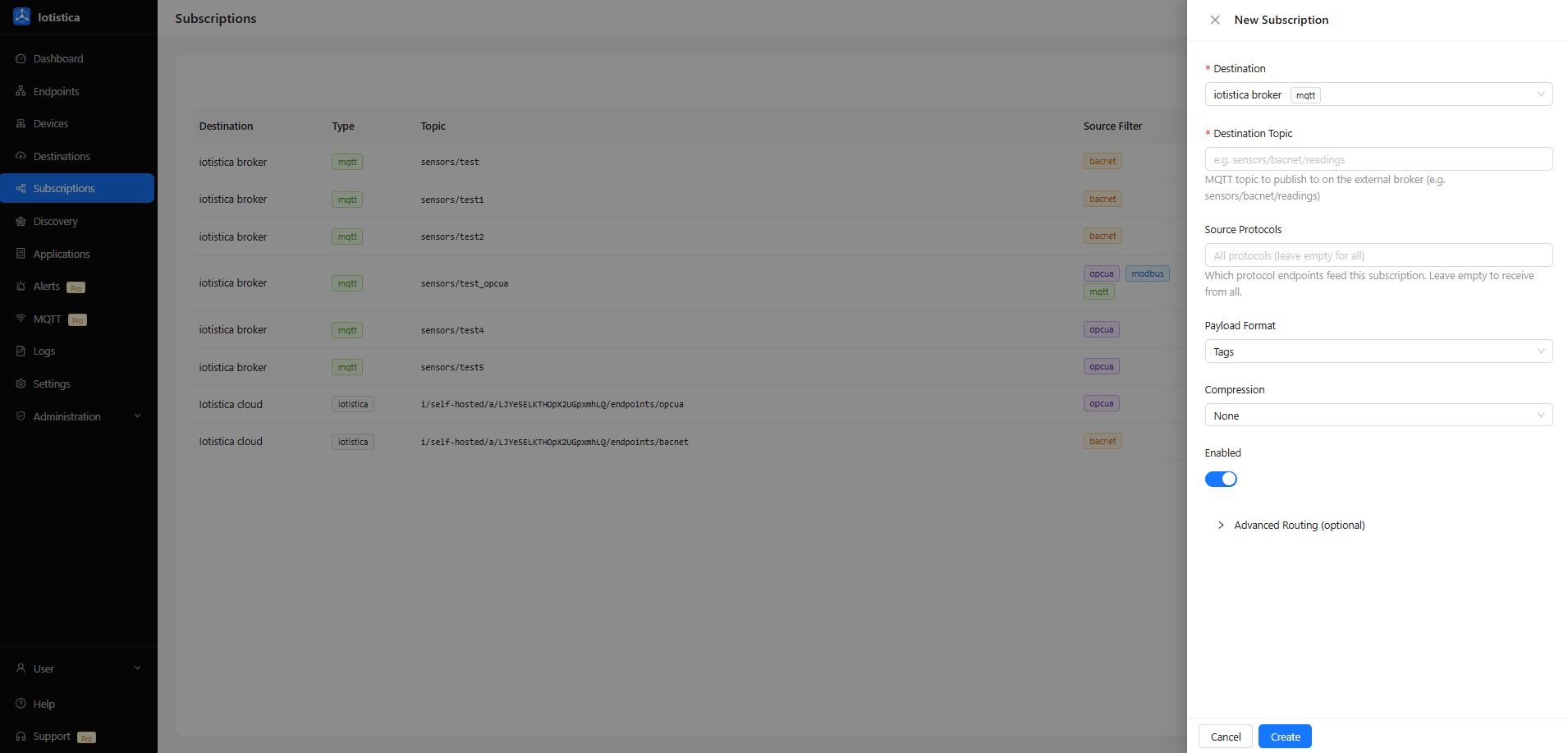
- Go to Subscriptions in the sidebar and click New Subscription.
- Select a Destination from the dropdown.
- Set the Source Protocol — leave it empty to receive data from all endpoints, or pick a specific protocol.
- Choose a Payload Format (see below).
- Enter the Destination Topic (for MQTT) or Measurement name (for InfluxDB).
- Click Save.
Data starts flowing immediately if the destination is reachable.
Payload Formats
The payload format controls how readings are serialized before being sent to the destination.
Custom (default)
A JSON envelope containing protocol metadata and the full array of readings:
{
  "timestamp": "2026-06-21T12:00:00.000Z",
  "protocol": "modbus",
  "messages": [
    { "name": "temperature", "value": 24.5 },
    { "name": "pressure", "value": 1.02 }
  ]
}
Good for MQTT destinations where you want to process the full batch on the receiving end.
Tags
A flat structure with a node name and a list of named tag/field pairs:
{
  "node": "Chiller-1",
  "group": "Chiller",
  "tags": [
    { "name": "temperature", "value": 24.5 },
    { "name": "pressure", "value": 1.02 }
  ]
}
Recommended for InfluxDB. The agent maps tag names to InfluxDB fields and the device name to an InfluxDB tag, giving you clean time-series data ready for Grafana.
ECP
A compact industrial format compatible with Sparkplug-style tooling. Tags with errors or null values are omitted from the output. Best for integrations with systems that expect ECP payloads.
Filtering by Device or Metric
Under Advanced Routing in the subscription drawer you can narrow what data is included:
- Include devices — only include readings from specific endpoint names
- Exclude devices — send everything except specific endpoints
- Include metrics — whitelist specific metric names
- Exclude metrics — send everything except specific metrics
Leave all filters empty to send all data from the selected protocol.
One Source, Many Destinations
You can create multiple subscriptions from the same protocol to different destinations. For example:
- Subscription A: all Modbus data → local MQTT broker (format: custom)
- Subscription B: all Modbus data → InfluxDB (format: tags)
Both run simultaneously. The agent publishes each batch to all matching subscriptions in parallel.
Measurement Override (InfluxDB)
For InfluxDB subscriptions, the Destination Topic field acts as a measurement name override. If you leave it blank, data goes into the measurement name set on the destination itself (default: metrics). Set it here to route specific subscriptions to a different measurement — for example, putting BACnet readings into hvac_data and Modbus into electrical_data.
Related Docs
- Destinations — set up where data goes
- Endpoints — set up where data comes from