GCP IoT Core
:::warning GCP IoT Core is deprecated Google Cloud IoT Core was deprecated and shut down on August 16, 2023. New deployments cannot use this integration. If you are running an existing GCP IoT Core setup that was migrated to a third-party successor, you can still use this destination by pointing the endpoint at the replacement MQTT bridge.
For new Google Cloud integrations, use the MQTT destination type to connect to Pub/Sub Lite MQTT Bridge or a third-party MQTT broker that feeds into GCP. :::
Send telemetry from Iotistica Agent endpoints to a Google Cloud MQTT bridge using JWT authentication. This destination connects to any MQTT endpoint that accepts a JWT as the password, including GCP IoT Core successor services.
How It Works
Agent endpoints (Modbus, OPC-UA, …)
         │
         ▼
   Subscription (agent)
         │  routes data to destination
         ▼
  GCP Destination (agent)
         │  MQTT over TLS :8883
         │  JWT auth (RS256 / ES256)
         ▼
  GCP MQTT Bridge (mqtt.googleapis.com)
         │
         ▼
  Cloud Pub/Sub → Dataflow / BigQuery / Cloud Functions
Step 1 — Create a Device Registry (IoT Core)
These steps apply to existing GCP IoT Core setups. Skip to Step 5 if you already have credentials.
- Open the Google Cloud Console → IoT Core.
- Click Create Registry.
- Choose a Registry ID, region, and attach a Cloud Pub/Sub topic for telemetry.
- Click Create.
Step 2 — Create a Device
- Open your registry → Devices tab → Create device.
- Enter a Device ID.
- Under Public key, select ES256 or RS256 and paste your public key (see Step 3 for key generation).
- Click Create.
Step 3 — Generate a Key Pair
GCP IoT Core authenticates devices via JWT signed with the device's private key. Generate an ES256 key pair (recommended):
openssl ecparam -genkey -name prime256v1 -noout -out ec_private.pem
openssl ec -in ec_private.pem -pubout -out ec_public.pem
Or RS256:
openssl genrsa -out rsa_private.pem 2048
openssl rsa -in rsa_private.pem -pubout -out rsa_public.pem
Upload the public key to the GCP device (Step 2). Keep the private key on the agent side.
Step 4 — Generate a JWT
A JWT for GCP IoT Core is a short-lived token (max 24 hours) signed with the private key. Generate one:
# Using the gcloud CLI
gcloud iot devices credentials create \
  --region=us-central1 \
  --registry=my-registry \
  --device=factory-floor-1 \
  --type=es256 \
  --path=ec_private.pem
Or manually with Python:
import jwt, time
from datetime import datetime, timezone

project_id = 'my-project'
private_key = open('ec_private.pem', 'r').read()

payload = {
    'iat': int(time.time()),
    'exp': int(time.time()) + 86400,   # 24 hours
    'aud': project_id
}

token = jwt.encode(payload, private_key, algorithm='ES256')
print(token)
You will need to regenerate and update the token before it expires.
Step 5 — Add the Destination in the Agent
- In the agent admin UI, go to Destinations → New Destination.
- Select type GCP IoT Core.
- Fill in the fields:
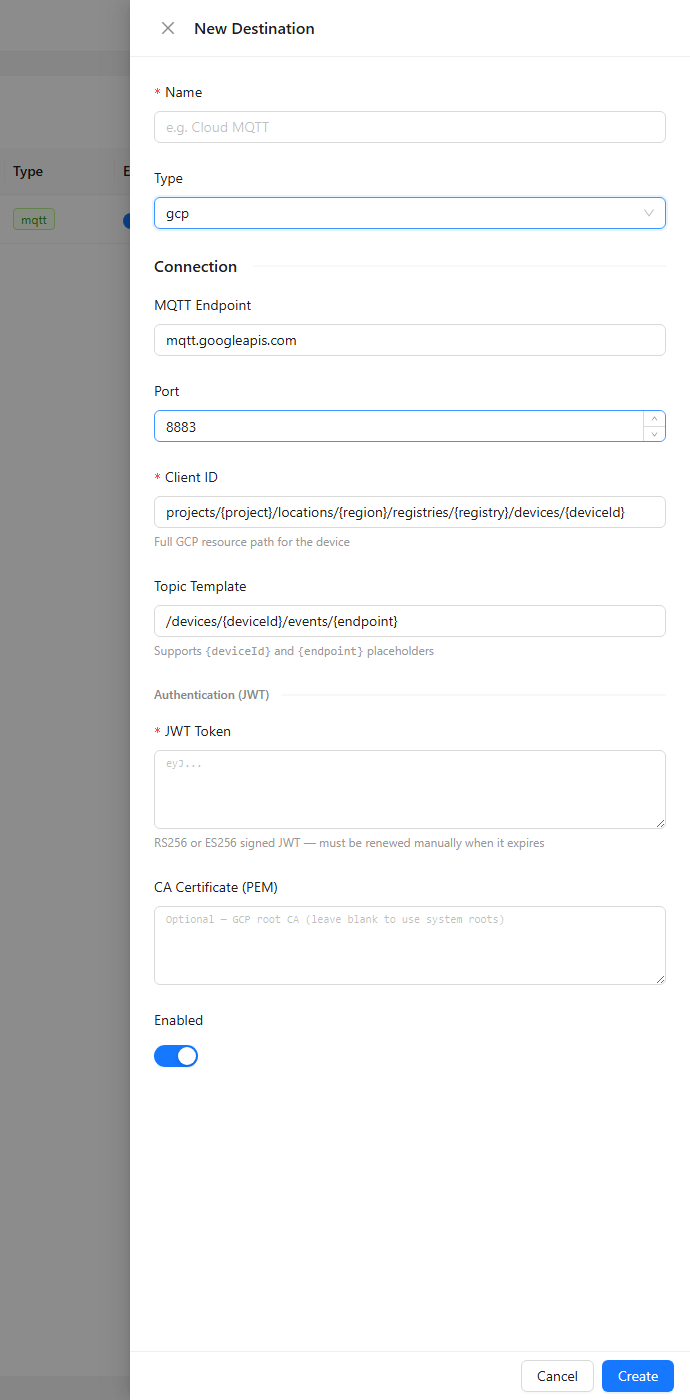
| Field | Value |
|---|---|
| MQTT Endpoint | mqtt.googleapis.com (or your replacement broker host) |
| Port | 8883 (default) |
| Client ID | Full GCP device path: projects/<project>/locations/<region>/registries/<registry>/devices/<device> |
| Topic Template | /devices/{deviceId}/events/{endpoint} (default) |
| JWT Token | The JWT generated in Step 4 (RS256 or ES256 signed) |
| CA Certificate (PEM) | (Optional) Google root CA — paste if TLS verification fails |
- Click Save.
Step 6 — Subscribe Endpoint Data
- Go to Subscriptions → New Subscription.
- Select the GCP destination.
- Choose endpoint topics to route (e.g.
modbus/+/readings). - Select payload format — Tags produces flat JSON suitable for Pub/Sub consumers.
- Click Save and enable the subscription.
Topic Template
The default topic template is:
/devices/{deviceId}/events/{endpoint}
Placeholders:
| Placeholder | Replaced with |
|---|---|
{deviceId} | The Client ID configured in the destination (URL-encoded) |
{endpoint} | The last segment of the source endpoint topic (URL-encoded) |
{topic} | The full source topic string |
GCP IoT Core routes messages published to /devices/<id>/events to the default Cloud Pub/Sub telemetry topic. Sub-topics (e.g. /devices/<id>/events/readings) route to sub-folder topics if configured in the registry.
JWT Expiry
JWTs issued for GCP IoT Core expire after at most 24 hours. The agent does not auto-renew the JWT — when the token expires the MQTT connection will be rejected.
To handle expiry:
- Generate a new JWT before the current one expires.
- Update the destination in the agent admin UI with the new token.
- The destination will reconnect automatically when saved.
For production use, automate JWT generation with a cron job or a GCP service account that writes fresh tokens to the agent API.
Viewing Data in GCP
To verify messages are arriving:
- Cloud Console → Pub/Sub → Topics → select your telemetry topic → View messages.
- Pull a batch:
gcloud pubsub subscriptions pull my-subscription --limit=10 --auto-ack
Cloud Pub/Sub Integrations
Messages arriving in Pub/Sub can be consumed by:
| Service | Use case |
|---|---|
| BigQuery | Long-term time-series storage and SQL analysis |
| Dataflow | Stream processing and transformation |
| Cloud Functions | Event-driven actions and alerting |
| Cloud Storage | Raw message archiving |
| Looker Studio | Dashboards from BigQuery tables |
Troubleshooting
| Symptom | Likely cause |
|---|---|
| Destination stays disconnected | JWT expired or malformed; wrong aud claim (must be GCP project ID) |
TLS handshake failed | Wrong endpoint host; missing root CA cert |
| Messages not appearing in Pub/Sub | Client ID format wrong — must be the full path projects/…/devices/… |
CONNECT rejected with RC 5 | JWT signature invalid; private key does not match public key registered in GCP |
Related Docs
- Destinations — creating and managing publish destinations
- Subscriptions — routing endpoint data to a destination
- Data Publishing — payload formats and topic structure