Azure IoT Hub
Send telemetry from Iotistica Agent endpoints directly to Azure IoT Hub using MQTT over TLS. Authentication uses Azure's SAS token mechanism — no certificates required on the agent side.
How It Works
Agent endpoints (Modbus, OPC-UA, …)
         │
         ▼
   Subscription (agent)
         │  routes data to destination
         ▼
  Azure Destination (agent)
         │  MQTT over TLS :8883
         │  SAS token auth
         ▼
  Azure IoT Hub
         │
         ▼
  Message Routing → Azure Stream Analytics / Storage / Event Grid
The agent generates a SAS (Shared Access Signature) token from the device's SharedAccessKey and connects via standard MQTT. Tokens are automatically renewed before expiry — the agent reconnects silently at 80 % of the token's TTL without dropping any messages.
Step 1 — Create an IoT Hub
- In the Azure Portal, search for IoT Hub and click Create.
- Choose a resource group, region, and hub name.
- Select the Free tier for development (8,000 messages/day) or the appropriate paid tier for production.
- Click Review + Create → Create.
Step 2 — Register a Device
- Open your IoT Hub → Devices (left sidebar) → Add Device.
- Enter a Device ID — use something meaningful like
factory-floor-1or the agent's UUID. - Leave Authentication type as Symmetric key and Auto-generate keys checked.
- Click Save.
- Click the device row to open it.
- Copy the Primary Connection String — it looks like:
HostName=myhub.azure-devices.net;DeviceId=factory-floor-1;SharedAccessKey=ABC123...==
Keep this string safe — it is the only credential you'll need on the agent side.
Step 3 — Add the Destination in the Agent
- In the agent admin UI, go to Destinations → New Destination.
- Select type Azure IoT Hub.
- Fill in the fields:
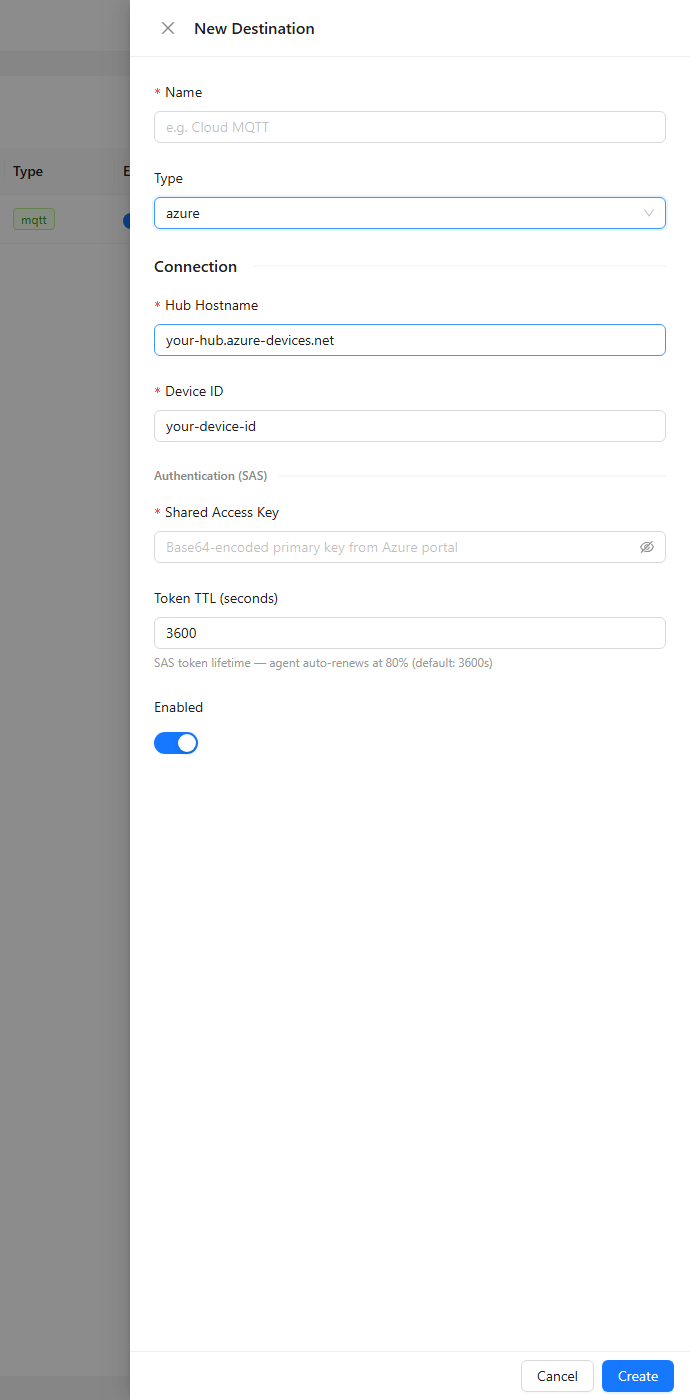
| Field | Value |
|---|---|
| Hub Hostname | From the connection string: HostName= value (e.g. myhub.azure-devices.net) |
| Device ID | From the connection string: DeviceId= value |
| Shared Access Key | From the connection string: SharedAccessKey= value (Base64) |
| Token TTL (seconds) | How long each SAS token is valid — default 3600 s (1 hour) |
- Click Save.
| Connection string field | Used as |
|---|---|
HostName | MQTT broker host (port 8883, TLS) |
DeviceId | MQTT client ID |
SharedAccessKey | Signs the SAS token password |
Step 4 — Subscribe Endpoint Data
- Go to Subscriptions → New Subscription.
- Select the destination you just created.
- Choose one or more endpoint topics to route (e.g.
modbus/+/readings). - Set the payload format — Tags is recommended for IoT Hub (produces flat JSON with field name as key).
- Click Save and enable the subscription.
Data will start arriving at IoT Hub within the next poll cycle.
Viewing Data in Azure
To verify data is arriving:
- IoT Hub → Overview → check the Messages received metric.
- Use the Azure IoT Explorer desktop app to monitor live telemetry from the device.
- Or from the Azure CLI:
az iot hub monitor-events --hub-name myhub --device-id factory-floor-1
Message Routing
Azure IoT Hub can route incoming messages to other services:
| Target | Use case |
|---|---|
| Azure Stream Analytics | Real-time transformation and alerting |
| Azure Blob Storage | Raw telemetry archiving |
| Azure Event Hubs | Fan-out to downstream consumers |
| Azure Service Bus | Queue-based processing |
Configure routes in IoT Hub → Message routing → Add a route.
The agent adds these MQTT user properties to each message, which can be used in IoT Hub routing queries:
| Property | Value |
|---|---|
$.ct | application/json |
$.ce | utf-8 |
endpoint | The source endpoint name from the agent |
SAS Token Renewal
SAS tokens expire after a configurable TTL (default: 1 hour). The agent handles renewal automatically:
- At 80 % of TTL the agent disconnects and reconnects with a fresh token.
- No messages are lost — the offline buffer absorbs any brief outage during reconnect.
- The TTL can be increased via the
AZURE_SAS_TOKEN_TTL_SECONDSenvironment variable on the agent (e.g.86400for 24 hours).
Troubleshooting
| Symptom | Likely cause |
|---|---|
| Destination shows connection error | Wrong connection string — check HostName, DeviceId, SharedAccessKey |
401 Unauthorized | SAS token clock skew — ensure agent system clock is accurate (NTP) |
| Messages not arriving in Hub | Check IoT Hub quota; Free tier caps at 8,000 msg/day |
| Device shows as disconnected in Portal | Device was registered but never connected; enable the destination and subscription |
Related Docs
- Destinations — creating and managing publish destinations
- Subscriptions — routing endpoint data to a destination
- Data Publishing — payload formats and topic structure