Dashboard
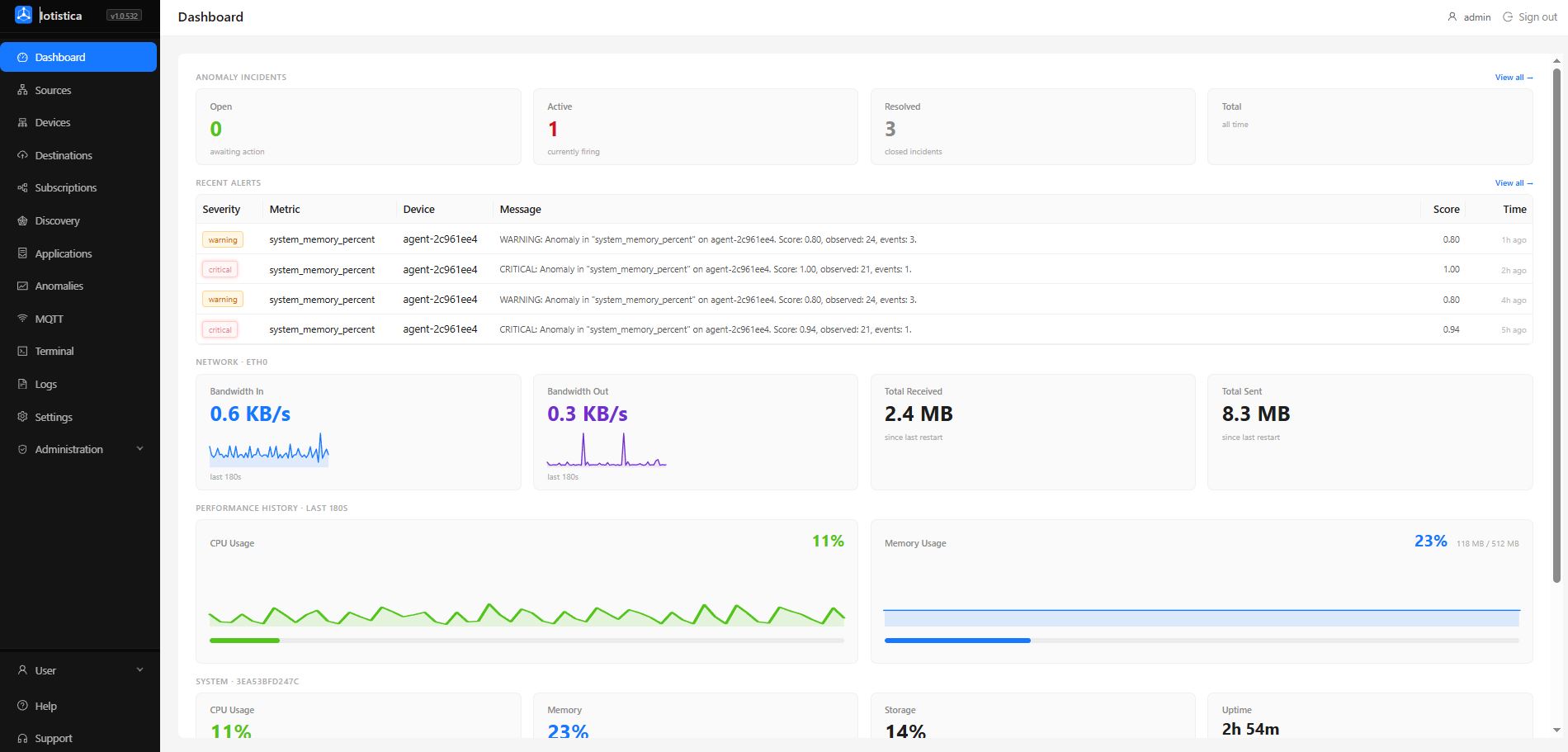
The Dashboard gives you a live view of anomaly activity and host-machine health. System metrics refresh every 3 seconds with a rolling 3-minute sparkline history. Anomaly data refreshes every 30 seconds.
Anomaly Incidents
The top section shows a four-widget summary of anomaly incident counts. All four widgets are clickable and navigate to the Anomalies page.
| Widget | What it shows |
|---|---|
| Open | Incidents awaiting action — orange when non-zero |
| Active | Incidents currently firing — red when non-zero |
| Resolved | Incidents that have been closed |
| Total | All-time incident count |
This section only appears once the anomaly engine has recorded at least one incident.
Recent Alerts
Below the incident counters is a table of the 8 most recent anomaly alerts, sorted newest first. Clicking any row opens the full Anomalies view.
| Column | Description |
|---|---|
| Severity | warning (orange) or critical (red). Critical alerts flash to draw immediate attention. |
| Metric | The data point that triggered the alert, with internal IDs stripped for readability |
| Device | The device the metric belongs to |
| Message | Human-readable description of the anomaly — score, number of observed events |
| Score | Anomaly score from 0 to 1 (1 = most anomalous) |
| Time | How long ago the alert fired (e.g. 2h ago) |
This section only appears when there are active alerts to show.
Network
The network row shows bandwidth for the busiest non-loopback interface on the device. The section label shows the interface name (e.g. NETWORK · ETH0).
| Widget | What it shows |
|---|---|
| Bandwidth In | Current inbound data rate (KB/s or MB/s), with a 3-minute sparkline |
| Bandwidth Out | Current outbound data rate, with a 3-minute sparkline |
| Total Received | Cumulative bytes received since last restart |
| Total Sent | Cumulative bytes sent since last restart |
Performance History
Two larger chart widgets show a rolling 3-minute history for CPU and memory with both a sparkline and a progress bar.
| Widget | What it shows |
|---|---|
| CPU Usage | Current CPU load percentage with history sparkline and bar |
| Memory Usage | Current memory percentage plus used / total in MB or GB |
Color coding matches the System thresholds below.
System
The system row shows a compact summary of the host machine's resources. The section label includes the device hostname.
| Widget | What it shows |
|---|---|
| CPU Usage | Current CPU load as a percentage |
| Memory | Used vs. total RAM, as a percentage and in MB/GB |
| Storage | Disk usage on the root filesystem |
| Uptime | How long the device has been running |
Color thresholds:
| Metric | Orange | Red |
|---|---|---|
| CPU | above 70% | above 90% |
| Memory | above 75% | above 90% |
| Storage | — | above 90% |
Network Interfaces
A table at the bottom lists every non-loopback network adapter with its current inbound and outbound rate plus cumulative totals since last restart.